Useful information for traveling to Japan
Date published: Sep 11, 2026
This post is a collection of information and tips that I would have found useful before my first Japan trip. A lot of this information isn't well captured in existing Japan travel content online, so the post should be helpful for others to avoid similar issues that I faced.
Navigation
This video by Kensho Quest is a good start to be mostly functional with the train system.
Keeping track of what fares to pay and how
Lots of videos online cover the different kinds of trains (local, rapid, limited express) and fares (base/local fare, limited express fare), but the main point I want to highlight is: Be clear on which fares are required for the types of trains you're riding, and be clear on how you're paying them.
Most trains that you'll use in Tokyo are "local" trains. To ride these, you need to pay a "base/local fare". I believe the base fare price is generally a function of how many kilometers you're traveling. If you're riding a local train from Shibuya station to Omotesando station (Ginza line), you'd tap your IC card and only pay the base fare. In total, you'll tap your IC card twice on this trip (once to enter Shibuya station and once to exit Omotesando station).
Sometimes you'll only ride local trains but need to transfer between train lines, and sometimes these train lines are managed by completely different companies. For example, in the case of transferring between train lines both managed by the same company: If going from Shibuya to Tokyo on JR Yamanote, followed by Tokyo to Shinjuku on JR Chuo, then when you arrive at Tokyo station, you would follow the JR Chuo signs to get to that line; there won't be a ticket gate to tap your IC at to get to the Chuo line because you're already in the "paid area" of the same company (JR) running the line. You only tap your IC card twice in total on this trip.

You can easily tell if two train lines are both run by JR because the train line symbols will be square-shaped
Another possibility is that you're transferring between train lines run by separate companies. For example, to get to Mount Takao for hiking, you might go from Kanda station to Shinjuku station (JR Chuo), followed by taking the Keio line to Kitano Station, followed by taking the Takao line to Takaosanguchi station. In this case, at Shinjuku station, you would look for the transfer gates to the Keio line and tap your IC card at those gates; that tap ends the JR trip and starts the Keio trip. Then you head to Kitano station, and then when you get off there you walk to the Takao line train; there's no ticket gate to tap at here because the Keio line and Takao line are managed by the same company. In total, you scan your IC card 3 times on this trip.
Another type of train you may take in Japan is a limited express train (特急). Along with the usual base fare, these trains also have a "limited express fare". For example, if you want to take the Keisei Skyliner from NRT airport Terminal 1 to Keisei-Ueno station, you need to pay for both the base fare (~¥1,280) and the limited express fare (¥1,300). You can buy tickets online or in-person, but in both cases I believe, you are given the option to either buy a combined ticket that includes both fares, OR you buy only a limited express ticket and then at the ticket gate you tap your IC card along with inserting your limited express ticket. I don't really understand why the option to do that exists when a singular, combined ticket would be simpler (I guess it gives people the option to pay the minimal amount while otherwise using their existing IC card balance?). In any case, the point is that you need to know if your ticket is a combined ticket that includes both fares or not, because that determines whether you also need to tap your IC card onto the gate.
The Shinkansen is another common example of a train type where you'll pay both a base fare and a limited express fare. If you buy your ticket on SmartEX (which I highly recommend unless you have a reason to purchase your ticket at the station), the ticket always includes both the base fare and the limited express fare. In other words, if you enter Tokyo station from the outside and go to the Shinkansen gates, you only have to scan the SmartEX QR code to go past the gates.
However, consider this example that actually happened during my trip: I wanted to go from Shinjuku-gyoenmae station to Tokyo station, and then take the Shinkansen to Kyoto station. To do this, I tapped my IC card in at Shinjuku-gyoenmae station (Marunouchi line), and then at Tokyo station, I tapped out of the Marunoichi line, and then I followed the signs for the JR/Shinkansen lines. I believe the signs took me to JR gates, and so I tapped my IC at the JR gates to enter the JR paid concourse area, and then I walked to the Shinkansen gates. Then at the Shinkansen gates, I believe I scanned my SmartEX QR code first, and then I scanned my IC card right after. It was important that I scanned my IC card here (even though I think the ticket gate already opened for me with just the QR code if I recall. Not sure) because I needed to close the "trip" I just started by scanning into the JR area. So by scanning my QR code, I handled the base fare plus limited express fare for the Shinkansen ride, and by scanning my IC card after, I concluded the "trip" (that isn't really a trip) that was started when tapping at the JR gates. If I didn't do this, I'd have a pending trip I believe and it'd probably cause problems the next time I tried using my IC card at a different station. As for why I didn't exit the Marunouchi line and then walk directly to the "direct" Shinkansen gates (as opposed to going through this JR transfer gate), it's because the recommended signed path in the station pointed me in this direction (presumably because it's faster and the extra IC tap at the Shinkansen gates isn't that complicated once you understand why it's necessary).
On the other hand, when I took the Shinkansen again from Shin-Osaka to Tokyo, I didn't have to scan my IC card as well because I was coming in from the direct Shinkansen gates (where I hadn't already scanned my IC card before to get there) and my QR code ticket was a combined ticket. Again, the main point is to be clear on what fares are required to enter/exit certain areas of a station and how exactly you're paying them (or not paying them in the case where I entered the JR concourse area only for that trip to be "closed" for ¥0 when tapping my IC card at the Shinkansen gate).
Station entrances/exits
Ideally, you enter/exit from the correct station exits that Google Maps specifies. Sometimes, the exits are labeled with a number, and sometimes with a name (and sometimes both). On Google Maps, usually both get shown, and so you can use both pieces of information and see which of them the station uses in their signs, and then from there you shouldn't have issues following the correct signs to your entrance/exit.
When trying to enter (or exit) a train station, if you can't find the exact entrance, it's usually fine to use a different entrance as long as it's for the same station (for example, if you can't find entrance C9 for Ueno station, you can always enter through C8 and you won't have any issues getting to your train). The worst case I experienced is having to spend a few extra minutes walking to the train platform that I needed to go to. For example, I was in Uji and entered the train station from the entrance closest to me instead of the entrance recommended by Google Maps, and because of this, once in the station, I remember having to go through some underpass (or overpass, I forgot) because we needed to board the train that travels in the opposite direction on the other side of the train platform, so we had to take this roundabout way to get to the other side of the tracks (when we would have already been on that side if we entered using the entrance that Google Maps suggested). I know in New York I've been in train stations where this sort of overpass/underpass didn't exist, and so it was important to use the correct entrance to be on the correct side of the platform, but I never saw this in Japan (maybe they exist though!).
I say "as long as it's the same station" because for example, entering the Keisei-Ueno station is not the same thing as entering the JR Ueno station (there are sometimes multiple stations in the same general area, and they are ran by different companies operating different train lines, so you want to make sure you enter the station that corresponds to the train line you want to get on).
Other tips
- One tricky thing with Google Maps is that sometimes the destination station on the recommended route doesn't match the station name on the signs in the station and train (i.e. Google Maps says "get off at PlaceA", but the signs at the station say "PlaceB"). I unfortunately can't remember any of the specific cases I came across, but I believe I got around this by closely watching my position on Google Maps and deducing what station I'm at based on what the previous stations were.
- If you accidentally enter a ticket gate using your IC card (e.g. for the wrong train line) and want to exit, then if you try to exit using your IC card, it may work and charge you a small admission fee (even though you didn't actually travel anywhere), but I believe sometimes it'll reject your IC card and you'll have to speak to a staff member to help you get out. In any case, I've heard that if you speak to staff, they may help you exit the station free of charge, so it's often better to speak to them anyway to help you get back out.
- It's actually pretty easy to change your Shinkansen ticket reservation with SmartEX. You won't have a huge selection of seats to pick, but otherwise it's convenient if running late (as long as you make the change before the departure date on your ticket I believe).
- Consider relying on taxis in some cases. If you're willing to pay the premium, you can significantly maximize the time you spend doing other things (e.g. around nighttime, you could do a 33-minute train ride from Shibuya to Ueno, or you could take a 16-minute taxi).
- Download the Google Maps data for your travel destinations beforehand so that you can use them offline (tutorial video here)
- For Kyoto buses: Every bus that I was on accepted IC cards, so there's not much to worry about. I believe most buses also accept cash (coins or ¥1000-yen notes only).
Tax-free shopping
Note: I don't think any of this information matters after November 1st, 2026 because the tax-free system will change then (you can learn more about that in this video)
As you may know, tax-free goods generally must be unopened until you reach the airport and fly out of the country. At least for NRT airport, after passing through security, there's an area where you'll see "kiosks" and signs saying to scan your passport if you did any tax-free shopping during your stay. After scanning your passport, you should see a confirmation screen, after which you can continue onward.
HERE is what is confusing: Japan’s National Tax Agency website tells travelers to "obtain customs confirmation before checking in your baggage with the airline company."
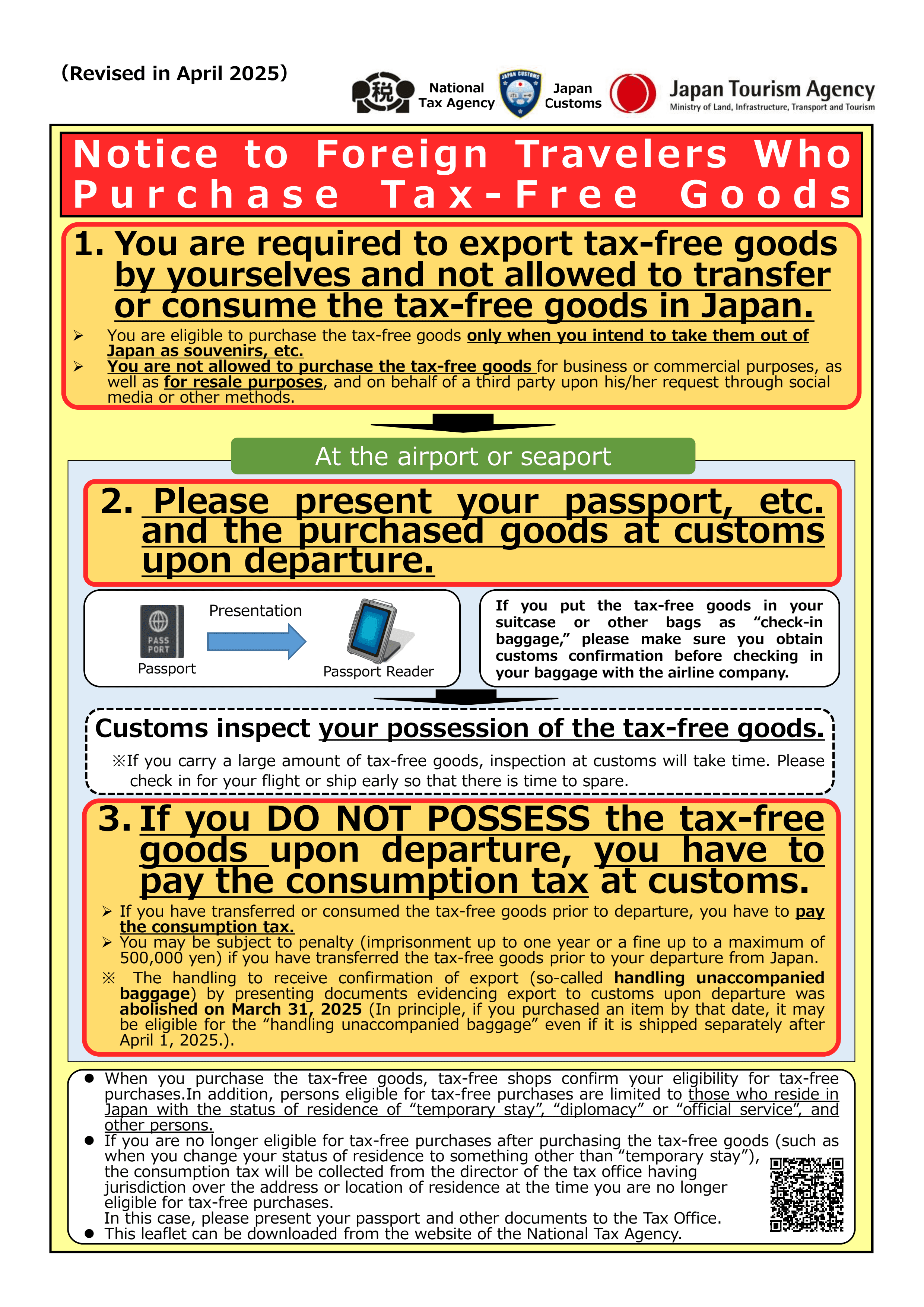
This is presumably because they wouldn't easily be able to audit the tax-free goods in your check-in luggage once already checked in. I think if they did ask to check your goods and you didn't have them (because of them being in your check-in bag), the worst case would be that they make you pay the consumption tax on those goods.
The problem though is that it's unclear where/how to get this "customs confirmation" at the airport! There's a little bit of writing online about this, but ultimately almost everyone disregards it (according to Reddit comments here as well as here, for example)! They check in their bags containing tax-free goods, pass through security, scan their passport at the tax-free shopping kiosks, and they continue with no problems. So that's what I did as well, and I had no issues, so you probably won't either...
Another point is that some videos I watched warned about "integrated kiosks" that you want to avoid because using them may mean you don't get the temporary visitor stamp in your passport that's needed for tax-free shopping. At NRT airport, I didn't even see integrated kiosks, and everyone had to go into the same line to speak with an immigration officer (who added the temporary visitor stamp into everyone's passport), so it seems impossible to go to the wrong place to get the stamp.
Restrooms
These places have restrooms that are free to enter
- Arcades (e.g. Round1 in Sennichimae, Osaka; TAITO Station in Akihabara)
- Department stores and malls (e.g. Osaka Takashimaya)
I remember most shrines and temples that I visited having restrooms (although the lines can get really long at the more popular locations). Also, in most cases, train stations will have a restroom, but it's usually past the ticket gate (so you need to already be planning to enter that station to use it). Some food and drink establishments also have restrooms that you can use if you purchase something.
Other general tips
- My phone plan ostensibly provides unlimited data even when in countries like Japan, but the internet speed was excruciatingly slow, making it difficult to e.g. travel around the city using Google Maps and the train system. I eventually bought a Ubiqi eSim (with 10% off code
KENSHOQUEST) which worked much better. - Keep in mind that instead of packing certain items, you can buy them when you arrive in Japan (I did this for sunscreen, for example; I bought a bottle of Biore UV Aqua Rich Watery Essence (SPF 50+ PA++++)).
- Carry your passport with you at all times while traveling in Japan - it's illegal not to (You likely were already planning on doing this though if planning to do tax-free shopping. I've heard you can use the Visit Japan Web site instead of your passport for tax-free shopping, but since not all stores accept that, using your physical passport is the safest.)
- It's easy to accumulate change as physical coins when in Japan and occasionally paying with cash. Holding some coins is useful (e.g. for vending machines or coin laundry machines that only accept coins), but to get rid of excess coins, you can use the coins to buy something from a vending machine. You could also top-up your Suica card at a convenience store, (which requires using cash; when doing this though, you're usually required to select a specific amount to charge like ¥1,000 / ¥2,000, so you'll have to ensure that your coin change plus bills add up to that specified amount to get rid of all your coins. Otherwise you may just get even MORE coins as change back!)
- To break large bills like 10k yen into smaller bills, you could go to a convenience store, select somehing like 3k for topping up your Suica, and then you'll receive change in the form of smaller bills.
- For coupons at Don Quixote and BIC Camera (and maybe elsewhere), see taxfreeshops.jp (e.g. the Don Quijote Traveler coupon gives up to 7% off on top of the 10% off from being tax-free)
- Don't 100% trust the information on Google and Google Maps for the opening/closing times of food/drink establishments (especially if not a popular chain/business). Sometimes businesses open later than expected and close earlier than expected. There's only so much that you can do about this.
- If returning to the US, you should keep in mind that at US customs, you may need to pay duty tax depending on the value of the items you're importing from Japan (tl;dr you pay no duty tax if under $800 in goods).
- Apps I downloaded
-
NHK World app (notifications for earthquakes, J-Alerts, etc)
-
Google Translate (make sure to download the Japanese language pack)
-
GO Taxi app
-
Xe currency converter
-
Things I want to get clearer on before my next visit
- What are my best options if I can't find a coin locker in the train station for my belongings (e.g. I've heard there are staffed luggage counters sometimes, but how would I find those? What about ecbo cloak? etc)
- Apparently a lot of options exist to help hold your belongings. Bounce, ecbo cloak, etc. I never used any of them though so I don't know how good they are, but I've heard that ecbo cloak can be a useful option for storing luggage for some time. In general though, traveling light is better, especially if you can also avoid having to do laundry.
- GO Taxi vs S.RIDE?
- What are alternative accomodation options like? (capsule hotels, internet cafes, etc)
- How to better find food/drink establishments and navigate Tabelog (and/or whatever Japanese people use)? How to best handle reserving tables at these places?
Miscellaneous information related to my trip:
- For LAX budget parking: the shuttle bus going from the budget parking area to our airport terminal was delayed (it should arrive every ~25 minutes, but it took ~35–45 minutes for our bus to arrive), which was nerve-wracking because there was no way to monitor the bus locations. Many Economy Parking buses came while we waited as well (they come every ~15 minutes). In any case, the LAX budget parking was reliable and worth using given its relatively cheap price. You could always call an Uber/Lyft if you felt like your bus wasn't coming for whatever reason.